by Lidia Paulinska | May 28, 2016
SID Display Week, May 2016 – Digital signage is used to entice and influence shoppers on their way to the retail stores and shopping malls. Tablets that replacing paper menus, allow restaurant patrons to preview and customize their orders. Engaging visual displays are revolutionizing leisure experiences, promoting increased consumer engagement as e.g. instant replay. Digital signage is a modern communication tool.
At the business session at SID Display Week the presenters: Sanju Khatri, Director of Digital Signage from IHS, Jennifer Davis from Leyard, Karen Robinson from NanoLumens and Paul Apen, Chief Strategy Officer of Eink gave broad overview of digital signage applications that is ambiguous communication tool of our time.
Sanju Khari mentioned needs of outdoor and high-brightness indoor digital signage applications. To address direct sunlight and heat load outdoor displays need to be >2000 nits of brightness, for indoor 1000 nits or higher. Brightness of LCDs can be further enhanced by adding LED backlights and increasing power consumption. However as LED backlights age, they provide fever inputs per watts of power. Cooling mechanisms are essential to maintain lifetime of displays. IP 64 and IP 65 rated. To address harsh and changing weather conditions outdoor displays need to withstand heat, humidity, snow, rain, wind, dust, fumes and dirt. Scratch and impact resistance properties of cover glass is important for both high-brightness indoor and outdoor displays set in high traffic areas. To address heavy usage cycle and vandalism digital signs placed at public settings need additional protection of cover material such as glass or polycarbonate. Important need is also serviceability. Down time of publicly placed outdoor or indoor advertising displays result in negative advertising revenue. Quick turnaround in service and display modules being accessible for on-site repair and maintenance is extremely important.
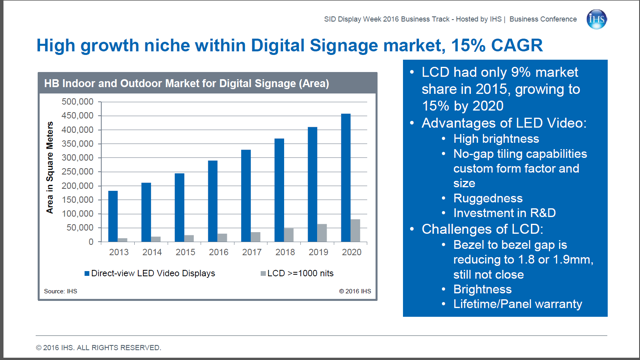
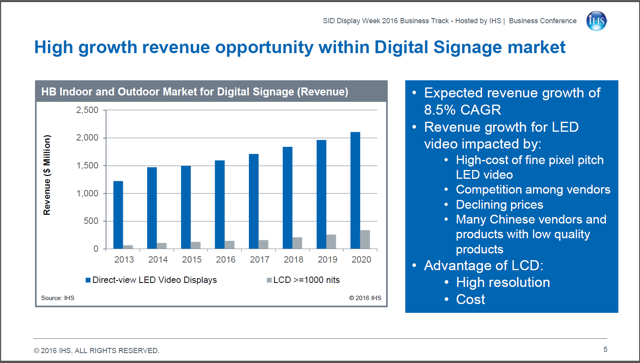
The Digital Signage market in numbers is growing as well as its revenue:
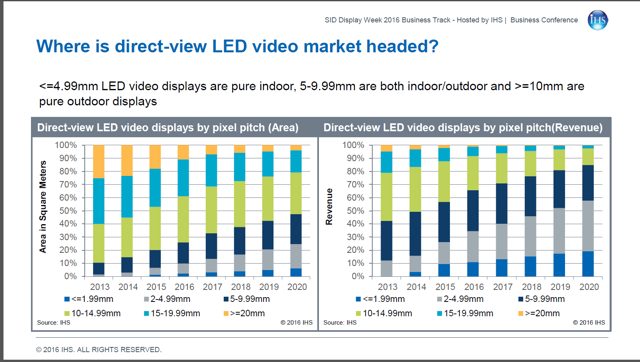
The direct-views LED video displays by pixel pitch in categories of area (square meters) and revenue are portrayed in stats below.
Jennifer Davis from Leyard described the market requirements for digital signage as simple words: Impact and Value – cost effectiveness to the outcome. Those include the features as: seamless (or close to it as they can afford), highly reliable for long-duty cycle applications (all day to 24×7), bright enough and wide enough color to have brand impact, good value.
What are possibilities at LED market?
No doubts that the LED market is expanding, less than 1.9mm pixel pitch grew 279% year in 2015, as well as this area visibility at the related shows such as: ISE, InfoComm China, where more fine-pitch LED offering and vendors were showcasing. The falling costs with the price elasticity makes market growth for LED. Led now is 13% more than rear-projection cubes and 7x the cost of tiled LCD. Down from 200% and 21x two years ago. Davis stated that future grown will be determine by innovations and market maturation.
Karen Robinson from NanoLumens shared her view on current generation that is driven by passion for social media that allows sharing and viewing video. As digital signage is an ambiguous communication tool: displays TV are rising in quality, not just quantity; mobile phone displays continue to improve and Dooh has shifted from vinyl wrapped boards to vibrant LEDs. Display driven generation demands that smartphone and tablet adoption have added new screens. Just as a reminder – in 2000 it was not possible to stream video over a phone. By 2018, over 2.5 billion consumers will enjoy ability to stream video on their smartphones as well as 1.5 billion tablet users worldwide by 2019. Today the average household has 5 or more video-enabled devices. Traditional signage, billboard and display advertising is rapidly shifting to digital and has changing the way we eat, shop, work, play and the way we live. By auto profiling customers and their expected behaviors ahead of their actual presence vendor can quickly customize and personalized the content. Displays become more interactive. Robinson presented few digital displays from worldwide that perfected to create engaging and immersive experiences: American Airlines Arena in Miami, Florida; Holt Renfrew in Ontario, Canada; Mac Cosmetics store in Waikiki, Honolulu, Hawai; Pacific Fair in Broadbeach, Australia; Sport Chek in Toronto, Canada; Telstra in Sydney, Australia and T-Mobile store in New York City, NY. Those examples combine four areas: Architecture, Information, Advertising and Art – she stated.
Paul Apen, Chief Strategy Officer of Eink talked about alternative signage that is ePaper. That display allows outdoor readability, unique form factors and off-grid installations. He stated that it can be used in many areas such as: transportation, conference room, public spaces or retail. The effective signage design should also complement its environment as ePaper does.
Dynamic content management is next thing coming. There will be more relevant content directly to shore, location, and customer. Also economics of the business is allowing the prices to go down. That is the trend now.
by Lidia Paulinska | May 22, 2016
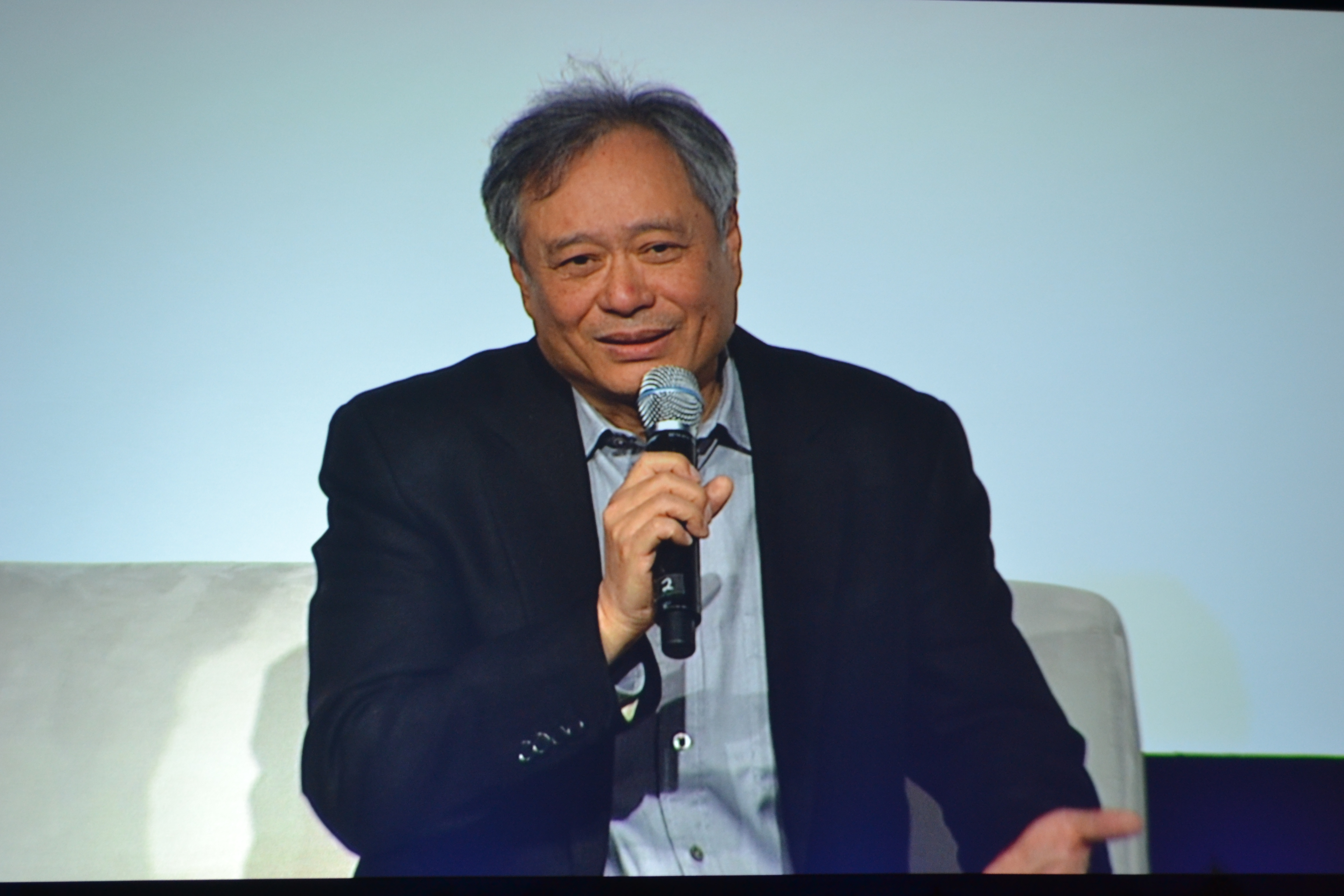
April 2016, NAB – At the start of NAB, SMPTE held the Digital Cinema Summit. The highlight speaker was Ang Lee who spoke following a discussion that HDR was not a tradeoff for future films, but was a technology that must be adopted due to its benefits in the story telling and immersive aspects of films. He spoke on pushing the limits of cinema.
One of the examples was with his film “Life of Pi”. In this film, the story is the enticing element. One aspect of the story was how to visually represent an irrational number and bring it to the screen as an experience. The film used 3D as an extra dimension in this story telling. HDR and HFR are also new technologies that can help with the story telling. HFR (High Frame Rate) has been under a recent resurgence as an alternative the traditional 24fps, and have been championed at NAB and other events by Doug Trumbull. Doug has been advocating 120fps content for both 2D and 3D films. Doug’s latest workflows include cameras, servers and editing flow for support of 3D, HDR, and 4K all at 120fps.
The workflow has over 40x the data of standard film, but produces an entirely different cinema experience. At NAB they had previews of an 11min clip of Ang Lee’s new film ‘Billy Lynn’s Long Halftime Walk,’ that was shot in 4K, HDR, 3D at 120fps. The preview was shown using dual Christie laser projectors and standard surround sound.
The clip provided an exposure to a new level of a “clarity of image” that has not been seen before by cinema audiences. This clarity of image defines a new challenge for the storyteller to be able to utilize this technology and enhance the story being told. The HFR feature also brings new cinematic capabilities to both 2D and 3D films. The HFR aspect also brings a new level of brightness and smoothness to the playback which can be used to enhance cinematic emotions and action without causing viewer fatigue. The overall common experience of the audience after viewing the clip – mostly related to technology and secondarily the cinematic use of the technology was “WOW!”.
by Lidia Paulinska | May 22, 2016
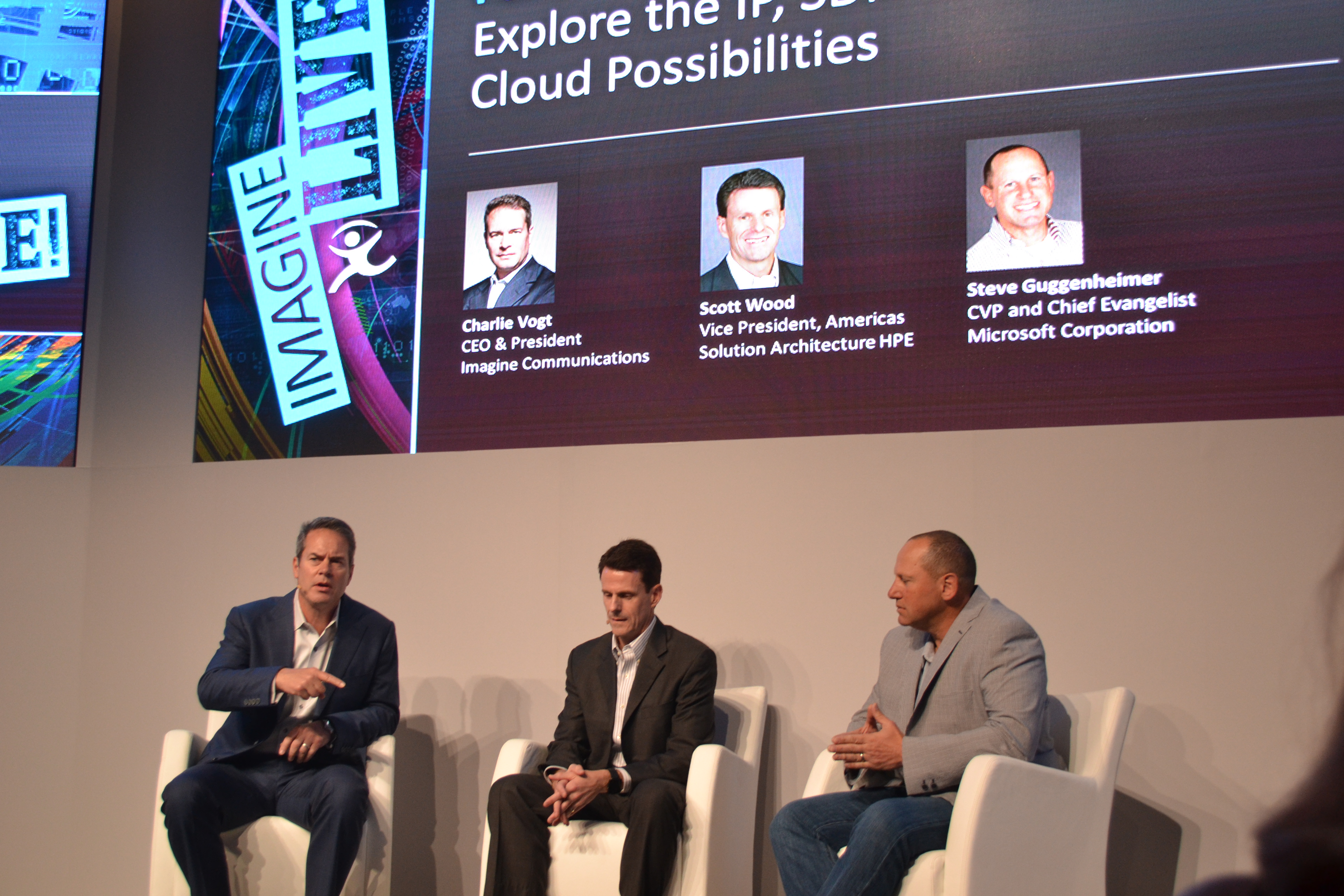
April, NAB – At the end of the day, the market is more and more competitive and we need our customers not only survive but also thrive – stated Charlie Vogt, CEO of Imagine Communications (IC), moderator of the power session “Transformation 2016: Media Technology Using IP, Cloud and Virtualization”. The session that took place at the Imagine Communications booth during NAB show, was featuring the panelists: Antonio Neri, EVP/GM, Enterprise Group, HPE and Steve Guggenheimer, CVP and Chief Evangelist of Microsoft Corporation.
Cloud-based technologies become more and more popular and there is a less speculation and more interest. But as the technology grows in popularity there is complexity involved. The options to choose from, the providers to select in order to put the pieces together. In the broadcast world everyone knows how complex the market is – stated the panelists – we want to make the complexity understandable. The cooperation between IC, Microsoft and HP Enterprise allow the companies to get full solution and reduce their own risk. So the customer does not need to talk to separate partners. It also to avoid confusion what works together etc. and what is not the best fit.
IC, Microsoft and HP Enterprise provide the leaders innovators solution. Microsoft is platform provider. HP is more cloud broker. Prior to NAB Imagine Communication launched 3 important applications, that required months and months of testing if the new solutions work. As Charlie Vogt mentioned IC and it’s partners goal is their customers to thrive versus not just survive. The reason is the move to the cloud, while necessary is scary, the broadcast community has been on premise for over 50 years, and the change is new.
The discussion included that cloud is a partnership – the tools, workflow, software and support all need to work together to provide the reliability and features of the current solution. As it moves to the cloud the partnership with HPE addresses the security aspects of the Azure cloud which are new to the broadcast community.
by Lidia Paulinska | May 21, 2016
April, NAB – Two years ago when we started to talk about IP and a question was – Can we do it? A year ago we were asking – Should we do it? This year a question is – How we do it? Steve Reynolds from Imagine Communications was describing the inception of AIMS, Alliance for IP Media Solutions, during our 1:1 interview. Reynolds added that in 2015 a lot of customers came to Imagine Communication with the concerns that they want to do IP but they were worried that is going to be a fragmentation in that segment of the industry. That was clearly need for AIMS.
NAB 2016 was a first year for AIMS, an industry consortium led by broadcast engineers, technologists, visionaries, vendors and business executives dedicated to an open-standards approach that moves broadcast and media companies to a virtualized, IP-based environment.
Reynolds explained that AIMS does not develop specs and standards. AIMS is trade of mind, it is marketing organization – he stated. The goal was to group the companies that primarily are working on broadcast technologies to get together and agree on the common set on the standards we want to use. The standards that are already developed. AIMS focus is on educating, evangelizing and spreading the adoption the technologies, but not to develop specs and standards. We here to help the adoption – he added. When the company joins AIMS it signs the adopter agreement, which says that they will promote this use of technologies, the AIMS roadmap, as you prefer to IP production.
More information about AIMS can be found here: http://aimsalliance.org/
by Lidia Paulinska | May 11, 2016
April 2016, NAB – Voice and language which is the most natural modalities we acquired since birth. No wonder that we are searching for communication with devices using our voice and language. Nuance Communications, has developed products that provide speech and imaging applications, is a leader in this area. If a customer uses voice commands to talk to automobile there is 99% chances that it is Nuance technology.
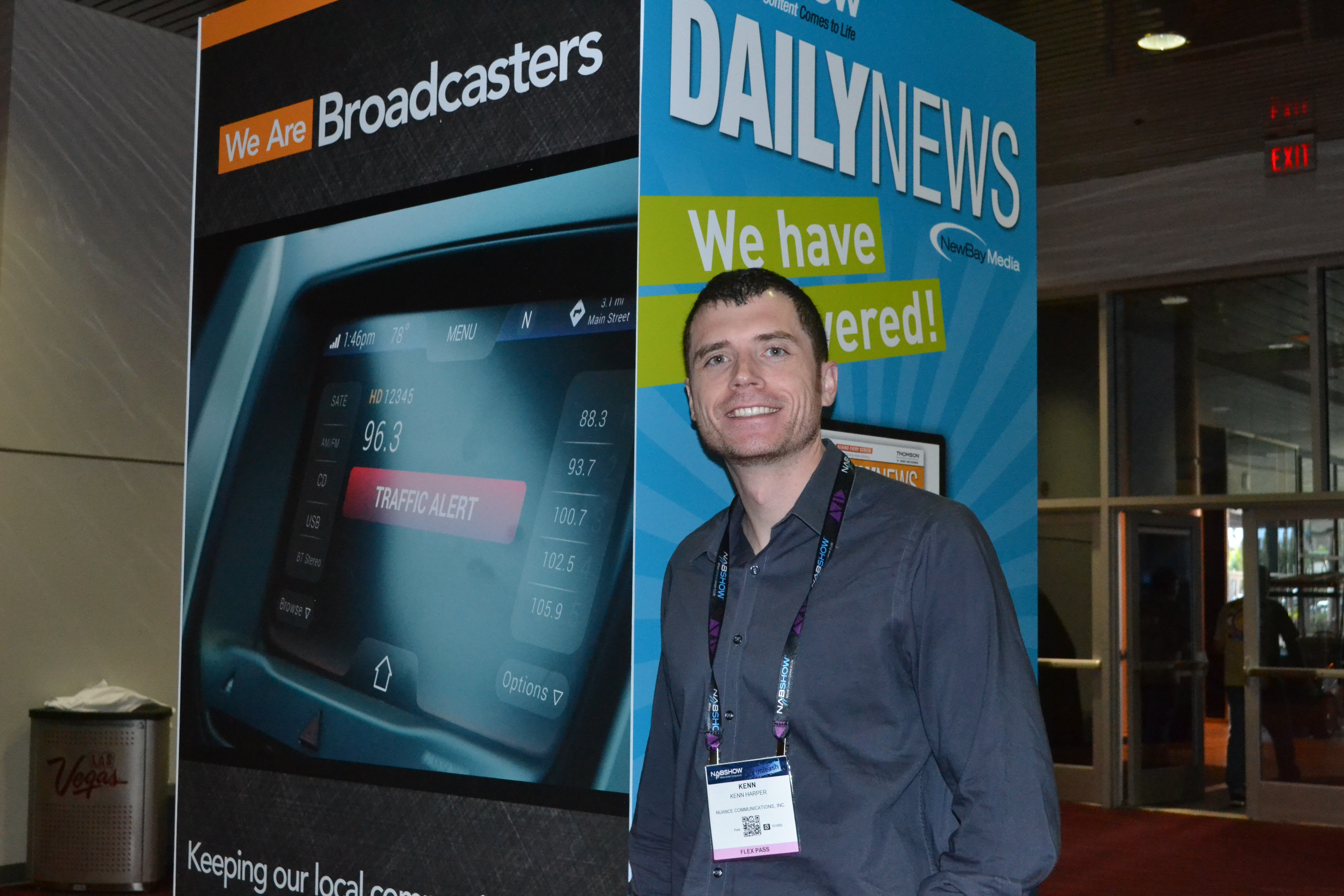
Kenneth Harper, VP, Devices & Ecosystem of Nuance talked to us about last advancements in transforming the TV experience with voice. Nuance has been working for some time on specific solution called Dragon TV that is going to have huge impact on the TV experience.
The TV room is usually a complex multi-person environment where the commands are mixed with conversations making voice control is a big challenge. While you are watching TV, your kids are playing or your other devices are talking to you. There are some advancements to solve that problem – said Harper. One of them is called signal enhancement. Nuance is looking at audio that is being recorded, usually from two different microphones that, depending on set up, use an integrated technology and solution that we use that can sit in the remote control or set top box. The technology trys to determine who is actually speaking in the living room. When we determine who that speaker is, we put what we called “a beamer” on that speaker. Then as a post processing task from all audio that was recorded, we enhanced that audio and suppress everything else. It called signal enhancement.
Accuracy matter in TV experience and Nuance making it work well.
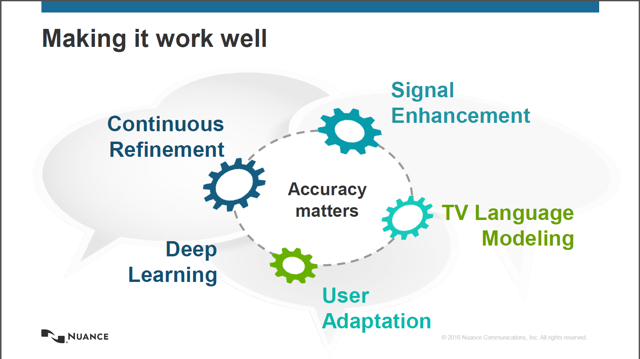
TV is not one piece but multiple pieces. Nuance covers the entire spectrum for TV by providing the enabling technology to manufacturers and then integrate it this with specific hardware devices or specific solution. Now when the second screens are considered as TV as well, a companion app is in use in that case. Sometimes it is at the set up box, sometimes inside the remote control. The customers have their preferences and Nuance follows their needs for both solutions– said Harper.
There is a difference between using TV and training Dragon for PC use to helping write an document or general input to a computer– mentioned Harper referring to our journalism work. TV uses mostly short comments that are fairly predictable. For TV there are certain things people going to do.
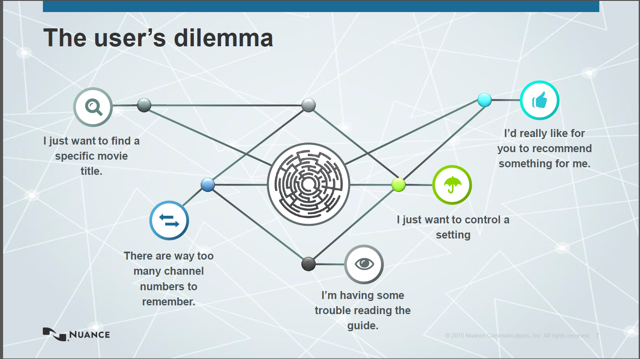
There are usually short commands, 5-6 unique words, we know the vernacular. Those are things that can be optimized – stated Harper. If a customer search for ‘movies with Bill Murray”. That’s how it all comes together.
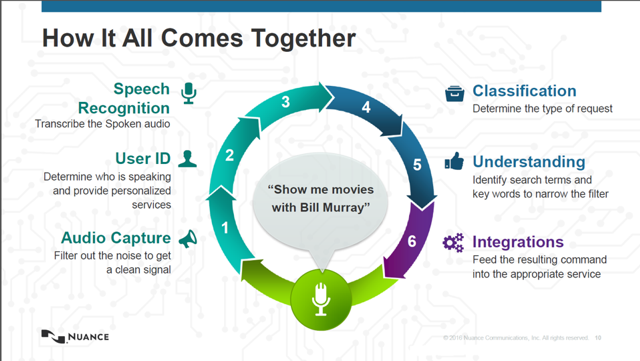
The future of the living room is set. TV becomes the central hub of the home and voice is becoming the primary interface.
by Tom P Kolodziejak | Apr 11, 2016
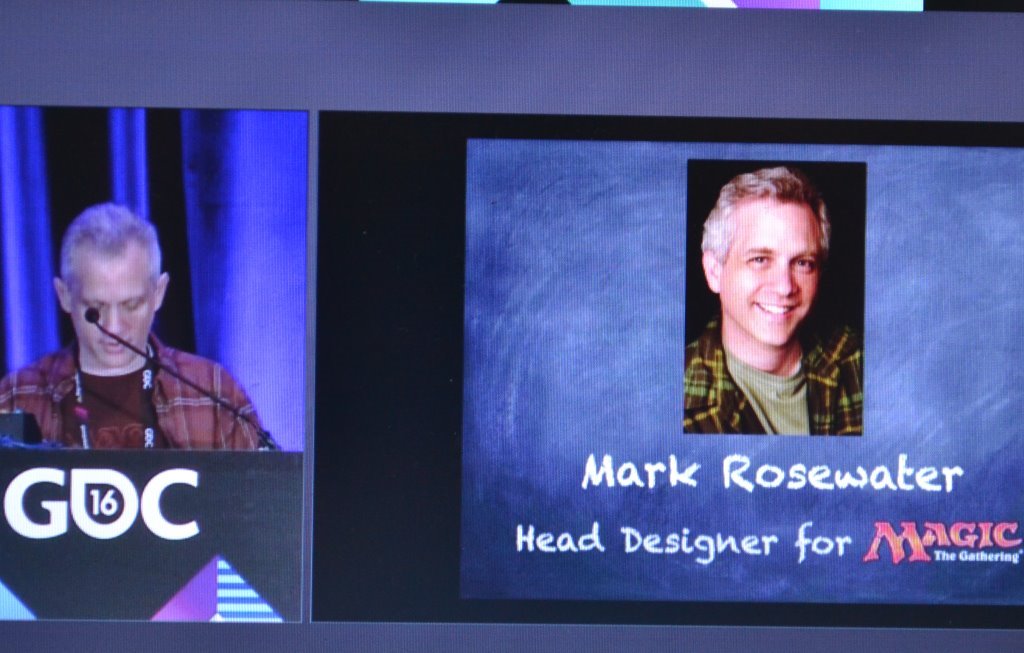
Game Developers Conference, San Francisco – Mark Rosewater, Head Designer for the “Magic: The Gathering” shared his experiences that he gained over the past 20 years on designing, improving, and advancing the same game. Since 1995, he has been working for Wizards of the Coast which created Magic: The Gathering. He mentioned not many games survived that long time and it is no wonder that the game went though many changes. In the period of 20 years they made: 86 randomized booster products, 69 non-randomized products, online licensed and other miscellaneous products, and produced over 14,000 unique cards.
There were also many lessons learned that the game designers can adopt in the process of building their games. Rosewater named 20 lessons. One for each year of his work.
Lesson 1: Fighting against human nature is a losing battle.
Knowing your audience is a key. Since your audience are humans, you know that they can be a little stubborn and have their own habits, so don’t try to change the players to match the game. Change your game to match the players.
Lesson 2: Aesthetics matter. Don’t fight human perception.
Aesthetics is also known as the Philosophy of Art or Science of Beauty. The idea of aesthetics is to study how humans perceive the world. There are differences between individuals, as well as common things that are aesthetically pleasing. In games, players expect the components of their game to have a certain “feel”. That is not only means visual aesthetics, but also things like balance, symmetry, and pattern completion. If any of these components are missing, it makes players feel ill at ease, distracts them from focusing on the game, and makes them pay attention to what your game isn’t instead of what it is.
Lesson 3: Resonance is important.
The audience already has preexisting emotional responses that the game designer can build upon. For example Magic did not invent zombies. Players come to the game with a pre-built emotional relationship with zombies that were created from years of watching pop culture. As a game designer, that’s a tool you should make use of.
Lesson 4: Make use of piggybacking.
Piggybacking is a use of preexisting knowledge to front-load game information to make learning easier. You don’t have to teach players things they already know, like killing a black cat is a bad luck.
Lesson 5: Don’t confuse “interesting” with “fun”.
There is 2 types of stimulation. There is intellectual stimulation (“interesting”) and emotional stimulation (“fun”). Looking at the cards is intellectual stimulation. Playing with the cards is emotional stimulation. We think about ourselves as intellectual creatures but we tend to make most of our decisions based less on facts and more on emotions. So, your game can speak to your audience on intellectual level or you can speak to them on emotional level. Both are valuable, but when you speak to the player on an emotional level, you are more likely to create player satisfaction.
Lesson 6: Understand what emotion your game is trying to evoke.
To be successful with a game you need to know what you want your audience to experience. What emotional response are you trying to create? You must continually ask yourself “What impact will this game choice have on the player experience”? And if it doesn’t contribute to the overall experience then it has to go.
Lesson 7: Allow the player the ability to make the game personal.
It is important for your players to have personal connection with your game. The more the players feel the game is about them, the better they will think of it. How do you do it? Provide a lot of choices, give them different resources, different paths, different expressions. Give the player the ability to choose (and not choose) things, allowing them to feel that what they choose is “theirs”. In Magic: The Gathering, the players can choose: colors, creatures, characters, factions, illustrations and the frames. There are many options available.
Lesson 8: The details are where your player falls in love with your game.
The players want to find a piece of game to call their own. The details matter because the individual will bond with the game through them. What might seem insignificant is anything but that. A small detail might only matter to a tiny percentage but to that percentage it could mean everything.
Lesson 9: Allow your players to have a sense of ownership.
You need to give the players an ability to build things that are uniquely theirs. The players don’t just create a deck of cards, they create THEIR deck: something what personally represents them. So when their deck wins, they win, because the deck is no longer just part of the game. It is an extension of themselves.
Lesson 10: Leave room for your player to explore.
Don’t always show the players the things you want to see. Let your players to find them. Let them discover things. Because if they find them, they will be more invested.
Lesson 11: If everyone likes your game but no one loves it, it will fail.
Players don’t need to love everything in your game, but they need to love something. Something they feel strongly about. Don’t worry that the players will hate something. Worry that no one will love anything, because things that evoke strong responses will most often evoke strong responses in many directions. This means that is almost impossible to make some players love something without making others players hate it. In fact some players enjoy hating what other players love. So stop worrying about evoking a negative response and instead develop something that evokes a strong response.
Lesson 12: Don’t design to prove you can do something.
Creative people tend to have larger egos, because it takes ego to will something into existence. Having an ego is fine but you can’t let your ego drive your motivations. You goal is to deliver an optimal experience for your target audience. Your decisions have to serve your game and not you. So, ask yourself: Is this decision helping me achieve the optimal experience for my target audience or is it being done to fulfill an inwardly facing need for self-satisfaction? If the answer is the latter, you are doing it for the wrong reason.
Lesson 13: Make the fun part also the correct strategy to win.
It is not the players’ job to find the fun, it is your job as a designer to put the fun where they can’t help but find it. Because when the players sit down to play the game there is an implied promise from the game designer that they will have fun. Remember – you have to make sure that what it takes to succeed at your game is the very thing that makes it fun. Fun can’t be tangential. It has to be the core component of your game experience.
Lesson 14: Don’t be afraid to be blunt.
Artists tend to prefer subtlety. They think show, don’t tell. But sometimes subtlety doesn’t work. People can just miss the obvious. For example in Magic we use the keywords to make sure players can focus on the mechanics.
Lesson 15: Design the components for the audience it’s intended for.
When you aim to please everyone, you often please no one. All your players don’t want the same thing out of your game. It is important to understand what different kinds of things your players want and to understand different kind of players you have.
Lesson 16: Be more afraid of boring your players than challenging them.
When you try something grandiose and it fails the players will forgive you, because they recognize you were trying to do something awesome. They respect the attempt and they even stick around to see what you will do next. But when you bore them, there is no such forgiveness, because making the same mistake is not the same as making a new one. When you bore the players, they resent you. Sometimes they stop playing.
Lesson 17: You don’t have to change much to change everything.
The game designers think there is never enough so they keep sticking more elements in. That creates complexity for your players and muddies the message of your game. You waste resources you could use later. Instead of asking how much I need to add? Ask – How little do I need to add?
Lesson 18: Restrictions breed creativity.
There is a myth about creativity that the more options available, the more creative people can be. But this contradicts what we know about how most brains work. The brain is amazing organ, it is very smart. When asked to solve a problem, most brains check their data banks and ask– Have I solved this problem before? If yes, it solves it the same way. Most of the time this is efficient. It lets you avoid relearning tasks each time you do them but it causes a problem with creative thought. If you use the same neural pathways you get to the same answers and with creativity that is not your goal. Here is the trick Mark shared with the audience. If you want to get your brain to get to new places, start from somewhere you have never started before. It forces you to think different in ways and create new problems to solve which results in new ideas and new solutions. What this means is that restrictions aren’t an obstacle but valuable tool.
Lesson 19: Your audience is good in recognizing problems but bad at solving them.
Your players have a better understanding of how they feel about your game than you do. You create the emotional response but they know what that is. They can easily tell when something is wrong. They are excellent in identifying problems. But they are not equipped to solve those problems. They don’t know your tools, your limitations. Use your audience as a resource, as a parameter to discover what’s wrong but take it with a grain of salt when they offer the solutions.
Lesson 20: All of the lessons connect.